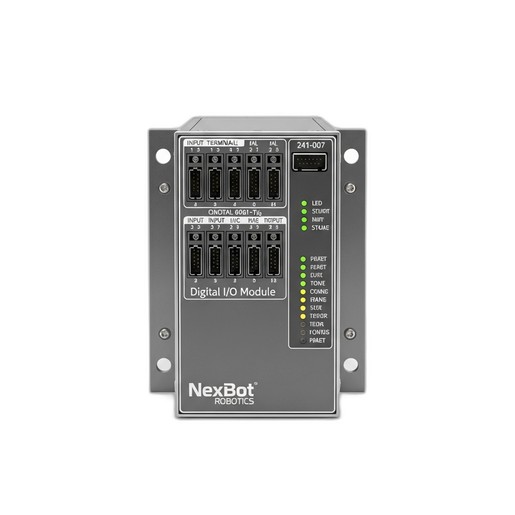
Provides a step-by-step guide to diagnose and resolve error E-1801, which indicates intermittent input or output signal loss on the NexBot 241-007 Digital I/O module.
Related Products
Tools Required
- Multimeter
- Small flathead screwdriver
- Laptop with NexBot controller software
- Lockout/Tagout kit
Article
This article provides troubleshooting steps for error code E-1801 (I/O Communication Fault) related to the NexBot Robotics 241-007 Digital I/O Module (SKU: NXB-GEN-241-007). This error signifies an unstable or lost connection, leading to unpredictable behavior in connected sensors and actuators. The issue is often observed in modules mounted on or near robot joints, such as J6, where cables are subject to repeated motion.
Symptom
The primary symptom is the appearance of error code E-1801 on the robot controller teach pendant or HMI. Other related symptoms may include:
- Inconsistent or flickering status LEDs (PWR, L/A, RUN) on the NXB-GEN-241-007 module.
- Unreliable operation of end-of-arm tooling, grippers, or sensors connected to the module.
- Robot program halting unexpectedly at steps requiring input from or output to the module.
- The module appearing and disappearing from the list of active EtherCAT slaves in the controller's network diagnostics utility.
Cause
The intermittent nature of this fault often points to physical or environmental factors. The most common causes are, in order of likelihood:
- Loose or Damaged Cabling: The EtherCAT network cable or the 24VDC power cable may have a loose connection, or the cable itself may be damaged from abrasion, pinching, or excessive bending stress. This is particularly common in applications on articulated robots like the R-20 and R-50 series.
- Power Supply Issues: An unstable or insufficient 24VDC power supply can cause the module to reset or behave erratically. Voltage drops under load or electrical noise can trigger communication faults.
- Environmental Factors: Although the module is rated to IP67, excessive vibration, exposure to liquids beyond its rating, or high levels of electromagnetic interference (EMI) can disrupt its operation.
- Incorrect EtherCAT Configuration: While less common for intermittent faults, an incorrect network configuration, duplicate node address, or corrupted ESI (EtherCAT Slave Information) file can cause communication instability.
- Faulty Module Hardware: In rare cases, the NXB-GEN-241-007 module itself may have an internal hardware failure.
Resolution Steps
WARNING: Always follow proper lockout/tagout (LOTO) procedures to de-energize the robot cell before performing any physical inspection or maintenance. Ensure all stored energy is released.
- Visual Inspection of Module LEDs:
- Observe the status LEDs on the module during operation (if safe to do so) or immediately after a fault.
- PWR (Power): Should be solid green. If it is off or flickering, suspect a power supply issue.
- RUN (EtherCAT State): Should be solid green, indicating the module is in the OPERATIONAL state. A flashing green light indicates a pre-operational state, and no light indicates a communication failure.
- L/A (Link/Activity): Should be solid or flickering green, indicating a physical network link and data activity.
- Verify Physical Connections:
- Power down the system using LOTO procedures.
- Carefully inspect the EtherCAT network cable (e.g., NXB-CBL-NET-002) at both the IN and OUT ports of the module. Ensure the M12 connectors are fully seated and the threaded collars are tightened securely.
- Inspect the 24VDC power connector. Confirm it is secure and shows no signs of damage or corrosion.
- Trace the cable paths, especially the robot dress pack, looking for signs of physical damage such as cuts, abrasions, or sharp bends.
- Check Power Supply:
- With the system powered on (use appropriate caution), use a multimeter to measure the voltage at the module's power input terminals.
- The voltage should be a stable 24VDC, typically within a +/- 10% tolerance.
- If the voltage is low, fluctuating, or shows significant AC ripple, investigate the power supply unit and wiring.
- Review Controller Diagnostics:
- Access the robot controller's software interface (e.g., on a NXB-CTL-212-008 controller).
- Navigate to the EtherCAT network diagnostics or bus configuration screen.
- Locate the NXB-GEN-241-007 module in the device list. Check its status. Look for error counters, specifically CRC errors or lost frames, which point to a poor quality signal.
- Verify that the correct ESI file is loaded for the module and that the network topology matches the physical connections.
- Isolate the Fault:
- If the module is not the last device in the EtherCAT chain, temporarily bypass it by connecting the incoming cable to the next device. If the rest of the network becomes stable, the issue is isolated to the module or its incoming cable.
- If a known-good spare NXB-GEN-241-007 module and cable are available, substitute them one at a time to determine which component is at fault. Start by replacing the cable, as it is the most common point of failure.
- Contact Technical Support:
- If the preceding steps do not resolve the issue, contact NexBot Robotics Technical Support. Please have the following information ready: the robot model and serial number, the error code (E-1801), and a summary of the troubleshooting steps you have already performed.
Prevention
To prevent recurrence of this fault, implement the following best practices:
- Ensure all cabling has proper strain relief and is routed to avoid pinching or abrasion during robot movement.
- Use a service loop with a sufficient bend radius for cables connected to moving parts.
- Periodically inspect cable dress packs as part of your scheduled preventative maintenance plan.
- Protect the module and connectors from direct exposure to high-pressure washdowns or corrosive chemicals.
- Ensure the 24VDC power supply is robust and not overloaded.