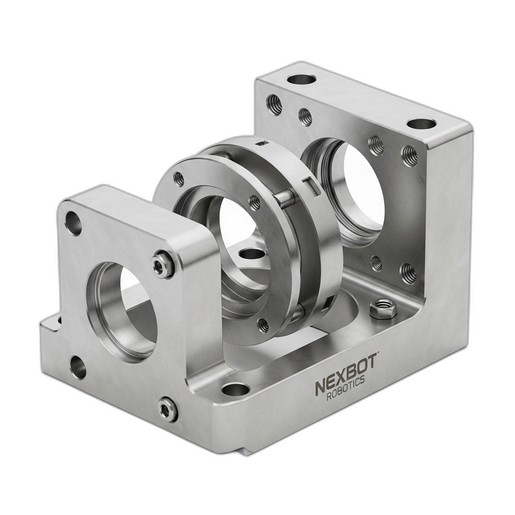
This technical bulletin provides detailed guidelines for the correct installation and application of the NXB-GEN-833-002 washer and spacer set to ensure proper alignment in NexBot robotic joints.
Related Products
Tools Required
- Calibrated torque wrench
- Metric socket set
- Metric hex key set
- Robot-specific service manual
- Lint-free cloths
- Mechanical bracing for robot arm
- Personal Protective Equipment (PPE)
Article
1.0 Introduction
This technical bulletin outlines the standard operating procedure for the installation of the NexBot Drives 833-002 Washer and Spacer Set. The proper use of these precision components is critical for maintaining the operational integrity, positional accuracy, and service life of compatible NexBot robotic systems. The NXB-GEN-833-002 set is manufactured from high-grade 304 stainless steel to provide superior corrosion resistance and dimensional stability in demanding industrial environments. Failure to follow these guidelines can result in premature joint wear, loss of accuracy, and potential damage to the robot.
2.0 Scope
This bulletin applies to the installation of the NXB-GEN-833-002 set on the following NexBot robot series and joint positions:
- Applicable Robot Series:
- R-20 Series (Articulated)
- R-50 Series (Articulated)
- C-10 Series (Collaborative)
- S-5 Series (SCARA)
- Applicable Joint Positions: J2, J3, J5, J6
Refer to the specific maintenance manual for your robot model to confirm component compatibility before beginning work.
3.0 Importance of Correct Installation
The washers and spacers in the NXB-GEN-833-002 set serve distinct but related functions:
- Spacers: Maintain a precise, engineered gap between rotating and stationary mechanical components. This prevents binding, ensures clearance for movement, and correctly preloads bearings.
- Washers: Distribute the clamping force of fasteners (bolts, screws) over a wider surface area. This prevents damage to softer housing materials and ensures that torque settings are maintained without component deformation.
Incorrect installation, such as omitting a component, reversing the order, or substituting with a non-specified part, can lead to joint misalignment, increased friction, vibration, and accelerated wear of bearings and gears.
4.0 Installation Procedure
WARNING: Robot maintenance must be performed by trained and qualified personnel only. Failure to follow safety procedures can result in serious injury or death.
4.1 Prerequisites
- Power Down: Completely power down the robot and its controller.
- Lockout/Tagout (LOTO): Follow all site-specific LOTO procedures to de-energize the system and prevent accidental startup. This includes electrical, pneumatic, and hydraulic energy sources.
- Secure the Arm: Mechanically brace or secure the robot arm to prevent unexpected movement or falling during maintenance.
- Review Manuals: Have the official service manual for the specific robot model available for reference, particularly for torque specifications and disassembly diagrams.
4.2 Step-by-Step Instructions
- Access the Joint: Carefully remove any external covers or guarding to access the target joint (J2, J3, J5, or J6).
- Disassemble Joint Fasteners: Following the procedure in the service manual, loosen and remove the primary fasteners for the joint housing or axis being serviced. Keep all hardware organized.
- Remove Old Components: Carefully separate the joint components to expose the existing washers and spacers. Remove and discard the old hardware being replaced.
- Inspect Surfaces: Clean all mating surfaces with a lint-free cloth and a suitable, non-corrosive solvent. Inspect the surfaces for any signs of galling, scoring, or excessive wear. Report any significant damage to a maintenance supervisor.
- Install New Components: Place the new washers and spacers from the NXB-GEN-833-002 set onto the shaft or into the housing as indicated by the service manual's exploded-view diagram. Pay close attention to the correct order and orientation of each part.
- Reassemble Joint: Carefully bring the joint components back together, ensuring they are properly seated and aligned. Do not force components together.
- Torque Fasteners: Re-install the joint fasteners. Tighten them in a star or crisscross pattern to the torque value specified in the robot's service manual. Using a calibrated torque wrench is mandatory.
5.0 Verification
- Manual Movement Check: Before restoring power, carefully and slowly move the serviced joint through its full range of motion by hand (if applicable and safe to do so). The motion should be smooth and free of any binding or grinding.
- Power On and Homing: Remove all tools from the work area. Reverse the LOTO procedure and restore power to the robot controller.
- System Homing: In a low-speed manual mode, command the robot to perform its homing or mastering procedure.
- Positional Accuracy Test: Run a pre-defined test program that moves the serviced joint to several known positions. Verify that the robot's Tool Center Point (TCP) achieves the programmed coordinates with the expected repeatability. Monitor the joint for any unusual noise or vibration during operation.